All here.
Clearly separate.
One inbox for your accounts. Individual colours and separate views help you keep work, personal mail and projects apart.
 Blizn.
FOR MAC, IPHONE, IPAD & APPLE WATCH
Work, personal life, passion projects. Blizn brings your mail accounts together — and gives you room to organise them your way.
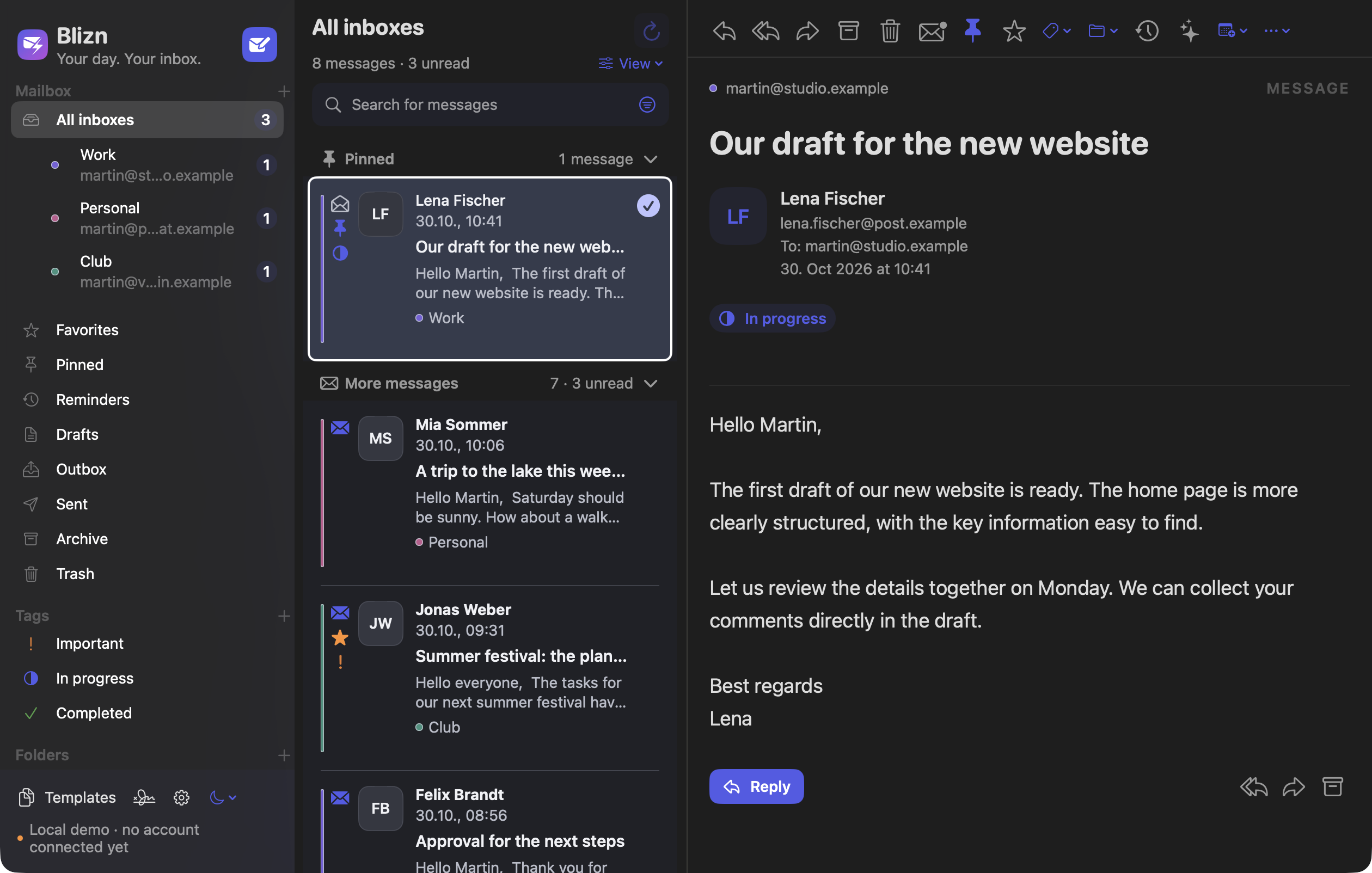
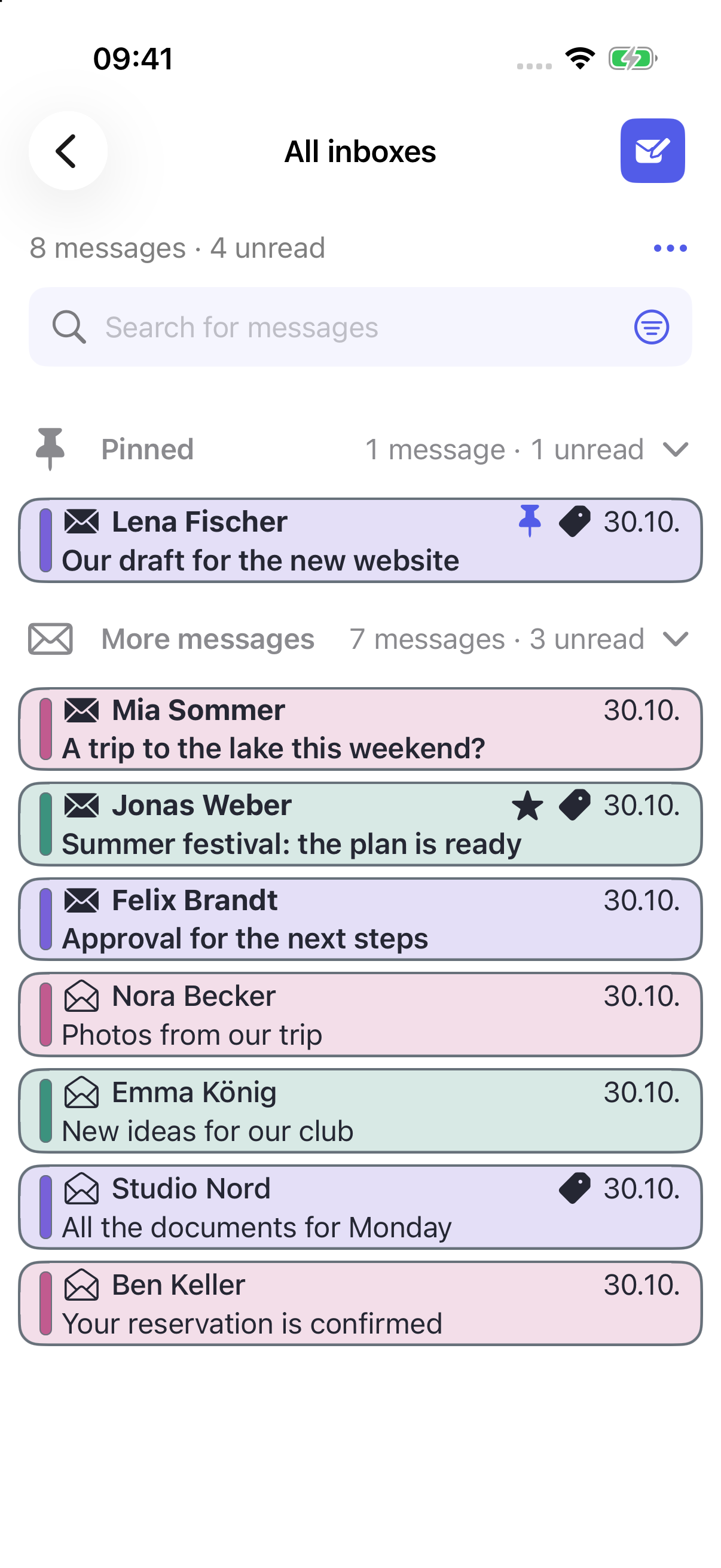 One inbox. Your overview.
Native Mac and simulator captures from the current local app development build show the English interface. All messages are fictional sample data; no real email is sent. The TestFlight beta may differ.
MORE ROOM FOR WHAT MATTERS
Your mail is part of your everyday life. Your mail app should fit around it.
One inbox for your accounts. Individual colours and separate views help you keep work, personal mail and projects apart.
Custom tags and smart folders bring your tasks together. Pin important messages, set reminders and adapt categories and lists to your day.
Templates with placeholders, formatted text and your own signature for each account. So familiar replies still sound like you.
The small examples illustrate features; the screenshots below show the app.
YOUR INBOX HAS ITS OWN STYLE
Give each account its own colour and choose how clearly it appears in your message list.
The layout fits you, too. The Detailed view shows more preview text and optional avatars. The List view shows messages in clear rows. The Compact list fits more messages on screen. You can also adjust the row spacing.
Easy to read. Easy to reach. Enlarge the interface up to 150% and the message content separately up to 200%. Choose your swipe actions and arrange the mail toolbar around the actions you use most. Sizes remain adjustable on each device.
Colour stripe: A calm list with your account colour along the left edge.
Four actual screenshots of the same app and the same example accounts. Click the image to see the differences in detail.
AT HOME. ON THE GO. WITH YOU.
Native interfaces for three devices.
Inbox and composing. Light and dark.
Work, personal mail and your club stay recognisable in one inbox. Account colours, pinned messages and tags add structure; the selected message opens alongside the list.
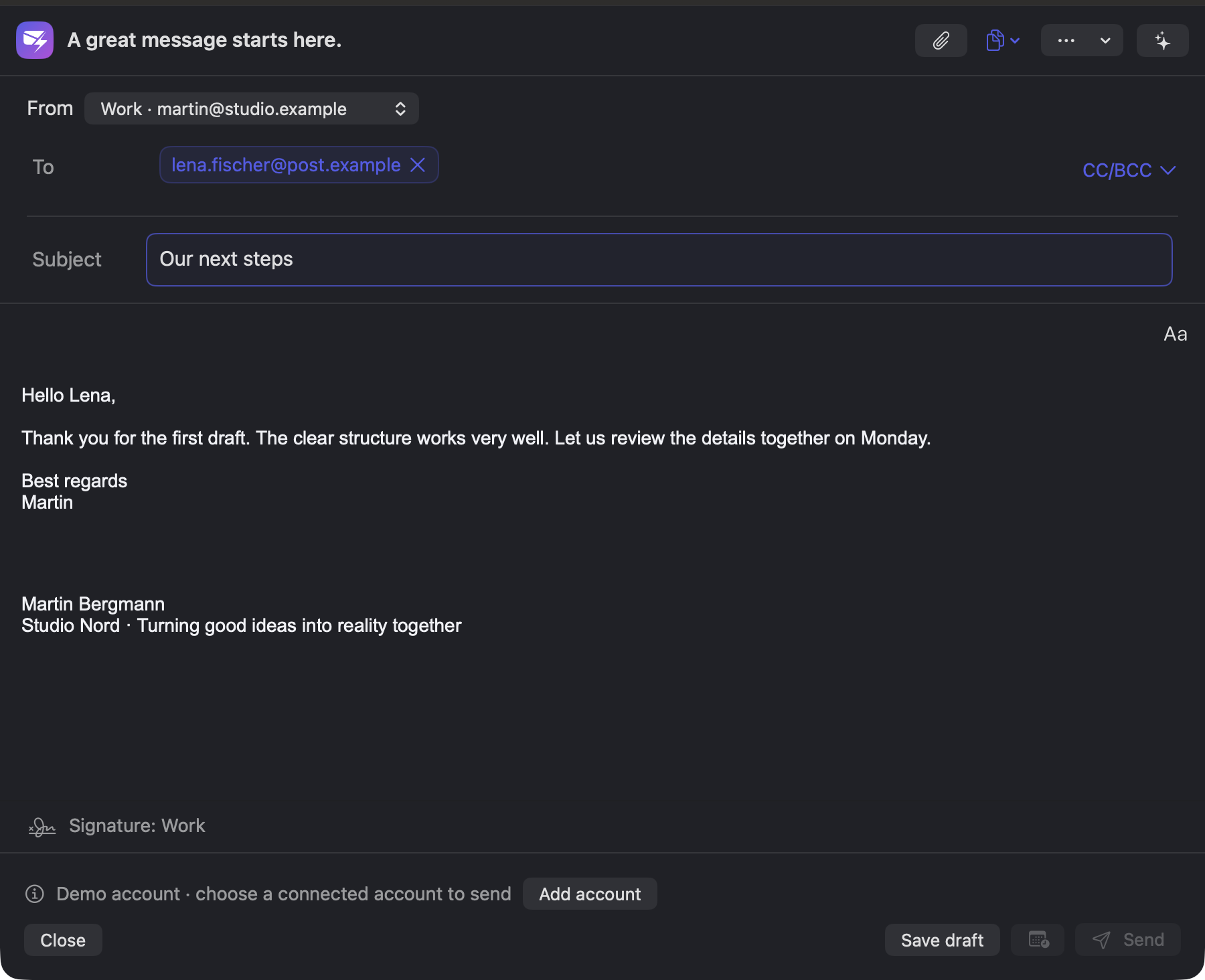
New screenshots from the current local app build with example messages.
SMALL HELPERS. EVERY DAY.
Find a particular email, save an appointment or check your draft once more. Blizn helps you take the next step.
Search by sender, subject, message text or attachment name. Combine criteria such as account, tag and date range, and save frequent searches as smart folders. You can load more messages from your provider.
Offline searches cover saved messages. Attachment file contents cannot be searched.
Blizn detects possible appointments directly on your device. Check the date, time and location, then deliberately add the event to your calendar. You can also select a passage of text or create an event manually.
Saved only after your confirmation. Your chosen calendar may sync through its provider.
Set a short delay before sending. As long as sending has not begun, you can take the waiting message back and edit the text, recipients or attachments.
Once the message has been handed to the mail server, it cannot be recalled.
If the optional draft sync produces different versions, you can compare recipients, text and attachments in the preview. You deliberately choose which version to continue using.
Enabled separately for each account and device. No automatic text merging; contents and attachments are stored with your mail provider.
FROM INBOX TO DONE
Use templates with placeholders, format your reply and add the matching account signature. On a wide iPad layout, you can see the original and your reply side by side.
Set a reminder for a message or prepare it to send later. Scheduled messages are sent from the original device once Blizn is running and a connection is available. On iPhone and iPad, the app must be open.
Optionally sync your setup through iCloud. Blizn drafts have a separate sync feature through your mailbox. This also stores unsent content and attachments with your mail provider; earlier versions may remain there. The outbox stays on each device.
FITS YOUR APPLE ROUTINE
Prepare a new message, refresh mailboxes or open search and drafts with Siri and Shortcuts. The message opens in Blizn for you to check.
On Mac, use shortcuts you have saved yourself. No automatic sending and no reading message content aloud.
Download received attachments, view them in the appropriate preview and save them. Drag files into the compose window; on Mac and iPad, you can drop messages onto supported folders.
Previewing and opening depend on the platform and file type. Apple Watch shows attachment names only.
Optionally show related received and sent messages as a conversation. Read the course of a reply chain without having to search for each email separately.
Conversations stay separate for each account. On Mac, Blizn can also open email links as your default mail app.
BLIZN ON APPLE WATCH
Your incoming mail, right on your wrist: switch between Unread, Inbox, Starred and Accounts. Read a message and review your short text reply before deliberately sending it.
Included in the current TestFlight beta, requires watchOS 10 or later. Attachments are listed by name. When connecting through iPhone, Blizn must be active there to send. Use without a reachable iPhone depends on the configured connection method.
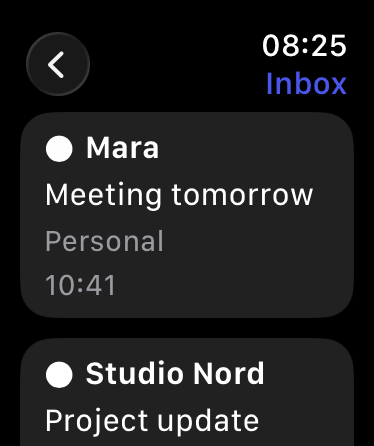
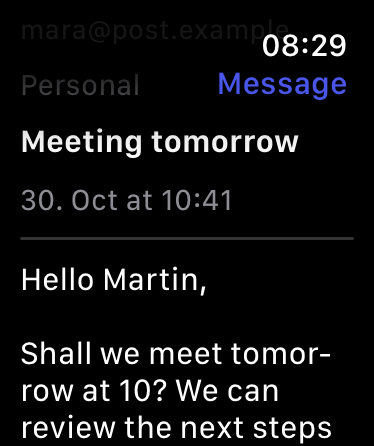
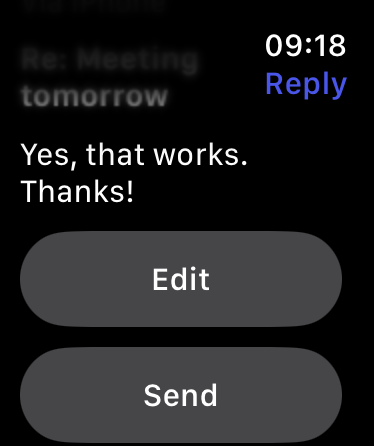
Native simulator captures from the same local development source as the rest of the image series show the English interface. Fictional sample data, no real email sent; the TestFlight version may differ.
YOUR MAIL. YOUR DECISION.
Mac, iPhone and iPad connect directly to your mail provider. On Watch, you can connect through your iPhone, directly to Gmail or through a separately configured self-hosted mail service. You do not need an extra Blizn account. Wallet-X does not operate its own mail server or AI proxy.
How Blizn processes your dataPasswords and sign-in tokens are stored in Apple Keychain. Optional password syncing can be enabled separately; OAuth tokens are not synced through iCloud. A Gmail credential can be explicitly transferred from iPhone to the paired Watch.
External images in HTML emails are blocked by default. You can deliberately allow them.
Off by default. You check the text and approve every request. Gmail content, including replies and forwards derived from it, is excluded from AI assistance.
Blizn does not use an advertising ID. Connected mail, Apple and optional AI services are also subject to their own privacy terms.
BLIZN IS TAKING SHAPE
Blizn is currently being tested in a free TestFlight beta by invitation. If you would like to try the app or share feedback, get in touch.
Interested in the beta?Opens your mail app. No newsletter or automatic subscription. Test invitations depend on available places.
Blizn supports Gmail through the Gmail API, as well as GMX, WEB.DE, iCloud and other supported IMAP/SMTP mailboxes. Microsoft sign-in for Outlook.com/Hotmail and Microsoft 365 is prepared but not yet enabled in the current beta build. Future use requires IMAP and SMTP to be permitted for the account, with administrator approval where needed for work accounts. Configure your own servers using their IMAP/SMTP settings; this does not promise general Exchange/EWS support. Depending on the provider, you may need an app password or administrator approval. Public Google verification is not yet complete; new Gmail sign-ins are currently being tested with approved test accounts.
Search by sender, recipient, subject, message text, attachment name, account, tag or date range. Save frequent searches as smart folders. Choose “Only saved emails” to search only the messages on this device; offline, only these messages are available as well. With a connected account, more provider results can be loaded in batches. Attachment file contents are not searched. For IMAP server searches, the required search criteria are sent to your mail provider.
Prepare a message, refresh all mailboxes or one account, and open mailboxes, unread messages, search and drafts. iPhone and iPad include matching Siri phrases; on Mac, add a Blizn action in Shortcuts and call your saved shortcut by its name. These actions do not send email. Message content and search results are not returned to Siri or read aloud.
On Mac, set Blizn as your default mail app under Settings → General → System Integration. Email links will then open a new draft in Blizn. Choosing Blizn as the default mail app on iPhone and iPad still requires Apple's approval and a correctly signed build; it is not yet enabled in the standard beta build.
Blizn is designed for macOS 15 or later, and iOS and iPadOS 17 or later. The Mac version supports Apple silicon and Intel. On Mac, app data and working directories require encrypted storage, for example through FileVault. The current internal TestFlight version also includes an Apple Watch app for watchOS 10 or later: read incoming messages, see attachment names and deliberately send short replies after reviewing them. Opening attachments, composing new messages, push services and complications are not yet included on Watch. Widgets are not yet included.
Optional iCloud sync covers your setup, such as account settings, tags, templates and signatures. It does not transfer the automatic mail cache or outbox. Blizn drafts can be synced through your mail provider after being enabled separately, including their contents and attachments. Earlier versions may remain visible there as additional drafts.
Yes. AI assistance is optional and off by default. For permitted content from other providers, you review the text to be shared before every request. AI assistance is blocked for Gmail and for replies and forwards derived from it. Your chosen AI service may have its own requirements and costs.
Instant push notifications for new messages on the server are not currently included. Optional iOS background fetching for the app badge is controlled by the operating system. Scheduled sending happens no earlier than the chosen time, once the app is running and the provider is reachable; on iPhone and iPad, Blizn must be open.
Not yet. The current TestFlight beta is free and by invitation. The later public release is planned to offer 14 free trial days followed by a one-time purchase. You can find the beta terms and information about the planned licence under Terms & Licences.
More your style.
More your Blizn.